
KDiskMark
Read our comprehensive review of KDiskMark, the premier open-source disk benchmarking tool for Linux systems. Discover how to test your drive speed today.
Imagine you have just installed a brand-new solid-state drive into your Linux workstation, or perhaps your system has suddenly started lagging during heavy file transfers. You need to know if your storage hardware is performing up to its advertised speeds, but running complex terminal-based diagnostic tools feels overwhelming. This is exactly where the KDiskMark disk benchmark tool steps in to simplify your system diagnostics.
What is the KDiskMark Disk Benchmark Tool?
Developed by Dmitry Sidorov (JonMagon), KDiskMark is a streamlined, open-source storage benchmarking utility designed specifically for Linux distributions. It provides a graphical interface that mimics popular Windows-based disk benchmarking utilities, making it incredibly intuitive for users transitioning to Linux or those who prefer visual data over command-line outputs.
Key Features of KDiskMark
Despite its lightweight footprint, this utility offers robust testing capabilities that cater to both casual users and system administrators:
- Highly Configurable Tests: Users can manually adjust the block size, queues, and threads count for every test run to simulate different real-world workloads.
- Comprehensive Report Generation: Easily export your performance results to analyze drive health over time or share data with support forums.
- Global Accessibility: With support for many languages, users worldwide can navigate the application in their native tongue.
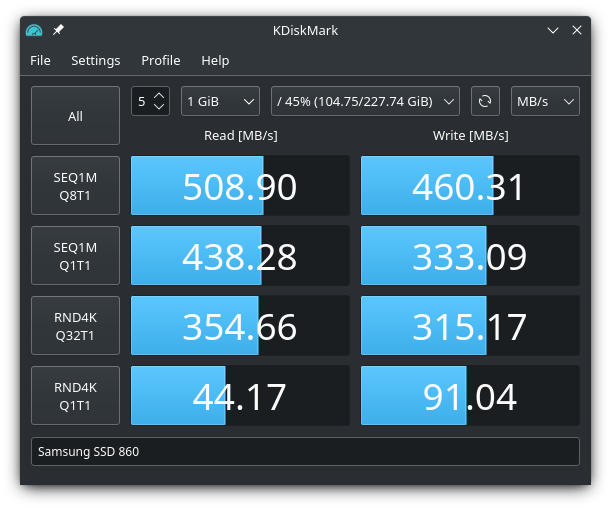
- Clean Graphical Interface: The user interface delivers clear, readable metrics for sequential and random read/write speeds.
Who is This Benchmark Tool For?
The KDiskMark disk benchmark tool is ideal for Linux enthusiasts, system builders, and IT professionals who require quick, reliable, and repeatable storage performance data. Whether you are checking a new NVMe drive, testing an older SATA SSD, or troubleshooting a slow hard drive, this application delivers precise insights without a steep learning curve.
Get Started with KDiskMark
If you want to verify your storage performance and ensure your Linux setup is running at peak efficiency, we highly recommend checking out this utility. To explore the application further, view screenshots, or get it for your system, head over to the official Flathub store page today.