

Freshy Search for Safari

Read our comprehensive review of Freshy Search for Mac. Learn how this Safari extension streamlines your web searches using quick address bar shortcuts.
The Ultimate Safari Address Bar Shortcut Tool
Freshy Search Safari extension is a lightweight, productivity-focused utility designed for Mac users who want to streamline their web browsing. Developed by Productive Apps LLC, this clever tool lives in your Safari browser and allows you to instantly redirect your queries to various search engines directly from the address bar. Instead of navigating to a specific website first or digging through browser preferences, you simply prefix your search terms with short, intuitive commands.
How Freshy Search Safari Extension Optimizes Your Workflow
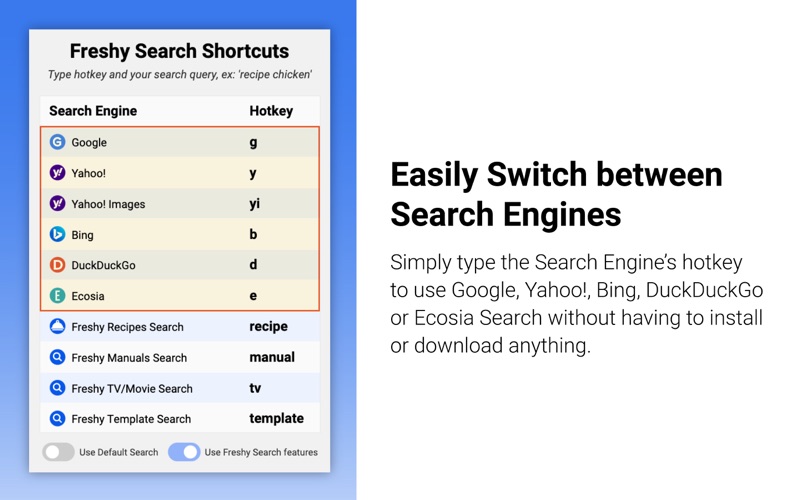
If you frequently find yourself switching between different search engines for work, research, or leisure, this extension eliminates unnecessary steps. By utilizing simple letter triggers, you can bypass default search settings on the fly. Here is how the shortcut system works:
- g – Search directly on Google
- y & yi – Query Yahoo or Yahoo Images
- b – Send your search term to Bing
- d – Browse privately with DuckDuckGo
- e – Support reforestation via Ecosia
- Specialized Searches – Use keywords like recipe, manual, tv, or template to access dedicated Freshy niche search engines instantly.
For example, typing "d apple" into your Safari address bar immediately queries DuckDuckGo for apple-related information, while entering "tv coda" searches Freshy TV & Movies Search for details about the movie Coda.
Who Benefits Most From This Extension?
The Freshy Search Safari extension is ideal for power users, developers, researchers, and anyone who values keyboard-driven efficiency. If you prefer to keep your hands on the keyboard and avoid repetitive clicking, this utility integrates seamlessly into your daily browsing habits. Furthermore, the developer, Productive Apps LLC, maintains a strict privacy stance, ensuring that your data is not sold, which provides peace of mind for privacy-conscious Mac users.
Flexible Configuration Options
If you ever want to perform a standard search without using a shortcut, the extension defaults to Freshy Web Search. Alternatively, you can toggle the "Use Default Search" option within the app settings to revert back to whichever search engine you have configured in your native Safari Search Preferences. This flexibility ensures that the utility never gets in your way when you want to browse normally.
To experience this streamlined browsing workflow for yourself, you can find the official download link on the Mac App Store to get started.