

Helm - Hosts File Manager
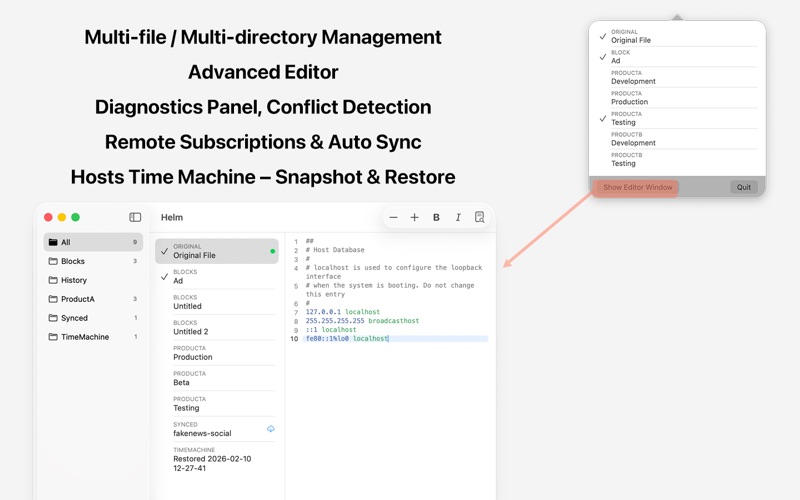
Read our comprehensive review of Helm, a premium hosts file manager for macOS designed to streamline local DNS configurations and environment switching.
Why Helm Changes the Game for Local DNS Management
For developers, system administrators, and power users, managing local DNS mappings has traditionally been a chore of terminal commands, sudo permissions, and easily corrupted text files. Helm - Hosts file manager changes this paradigm entirely on macOS. Instead of wrestling with vim in the terminal, Helm provides a native, elegant interface that treats your host configurations as modular, manageable assets rather than a single chaotic text block.
Streamlined Environment Switching and Organization
The standout philosophy behind Helm - Hosts file manager is modularity. Rather than maintaining one massive, confusing hosts file, Helm allows you to segment your entries into logical groups—such as Staging, Production, or local Development environments. You can toggle these groups on or off individually or combine them dynamically. When you apply changes, the app automatically flushes your system DNS cache, meaning your new routing takes effect instantly without manual intervention.
Key Capabilities of Helm
- Smart Conflict Detection: Helm proactively scans your active files to identify duplicate domain mappings to different IP addresses, safely handling both IPv4 and IPv6 dual-stack setups.
- Remote Configuration Sync: You can subscribe to external hosts files via URL, making it incredibly simple to sync shared team configurations or custom domain blocklists on a set schedule.
- Built-In Network Diagnostics: Troubleshoot routing issues directly inside the app using integrated tools like ping, dig, and nslookup.
- Safety Backups: Helm maintains a history of your hosts file snapshots, allowing you to roll back to any previous version with a single click if something goes wrong.
Who is Helm - Hosts File Manager For?
If you regularly switch between staging environments, manage multi-tenant local servers, or need a clean way to handle team-wide network overrides, Helm is an indispensable addition to your macOS utility toolkit. It bridges the gap between raw system files and visual workflow efficiency, saving time and preventing costly routing mistakes.
Get Started with Helm
If you are ready to replace manual command-line editing with a secure, highly organized workflow, we highly recommend exploring this utility. To learn more or purchase the application, visit the official page on the Mac App Store.